
The service in short
What Is Pirlo TV?
Pirlo TV is a free live sports streaming service on the web, in the tradition that searchers know as Pirlo TV Rojadirecta: a daily agenda of matches, a page of live channels, and very little standing between you and the game. Its own welcome line says it plainly: follow live football like the Champions League, Liga MX, the Premier League, NBA, Formula 1, UFC and more, and enjoy your favourite tournaments.
The Pirlo TV app on this page is the Android way in. It has no heavy native player to install, so the APK is a lightweight app front end, just 25 KB, that opens the service inside the app and keeps it one tap from your home screen. The agenda and the channels update on the service itself, which is why the app can stay this small: it is a well-made doorway, not a warehouse.
What the service does
Pirlo TV Features
Everything below is part of the service as it runs today, checked against the live pages.
- A daily agenda, timed and ordered: the day's matches listed by start time, each labelled by competition, from a Copa Sudamericana evening game to the late Liga MX start.
- Several channel links per match: open a match on the agenda and it expands into multiple options, such as Canal 1 and the numbered HD channels, so a dead link is a detour and not the end of your evening.
- A standing channels page: 21 live channels listed by name, including ESPN, ESPN 2, ESPN 3, ESPN 4 and ESPN 5, DSPORTS, TNT Sports Premium, TUDN and Win Sports.
- Five sports, one desk: football first, then NBA basketball, Formula 1, UFC and boxing, all reachable from the same two pages.
- No account, no subscription: Pirlo TV is free to open and free to watch, funded the old web way rather than by a paywall.
- A featherweight app: the Android front end is 25 KB, installs in seconds on modest phones, and asks for nothing but an internet connection.
Plenty of streaming pages promise the world and deliver a maze. This one promises an agenda and a channel list, and delivers exactly that, every day.
Captured from the service
Screenshots: Agenda, Links and Channels
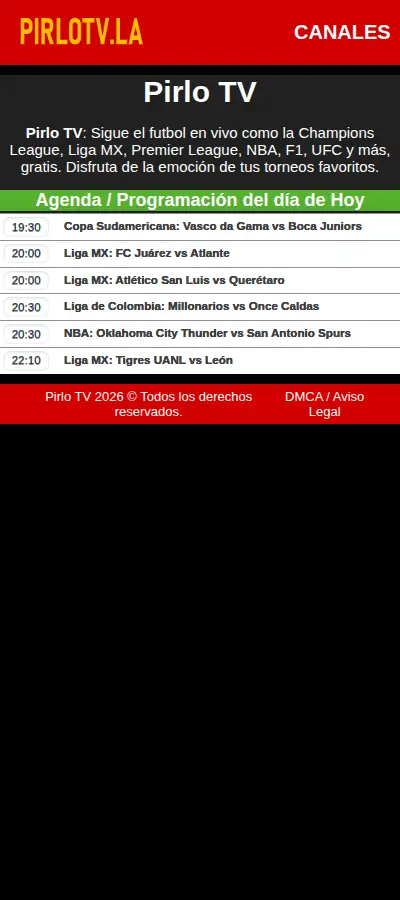
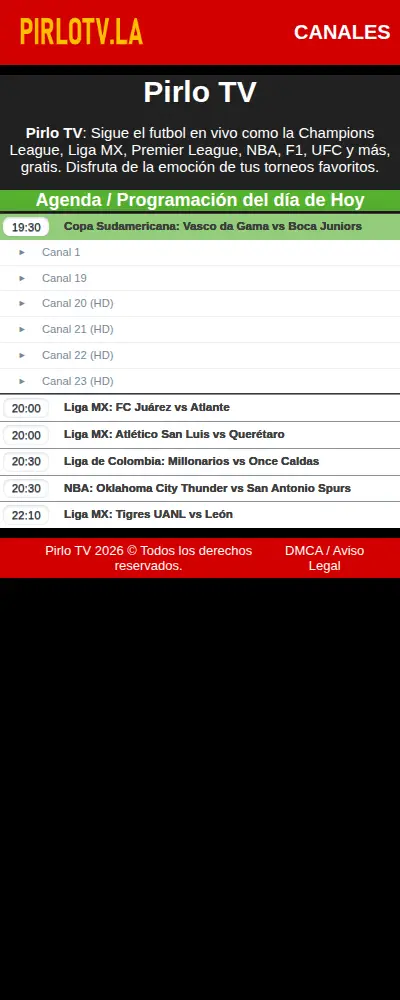
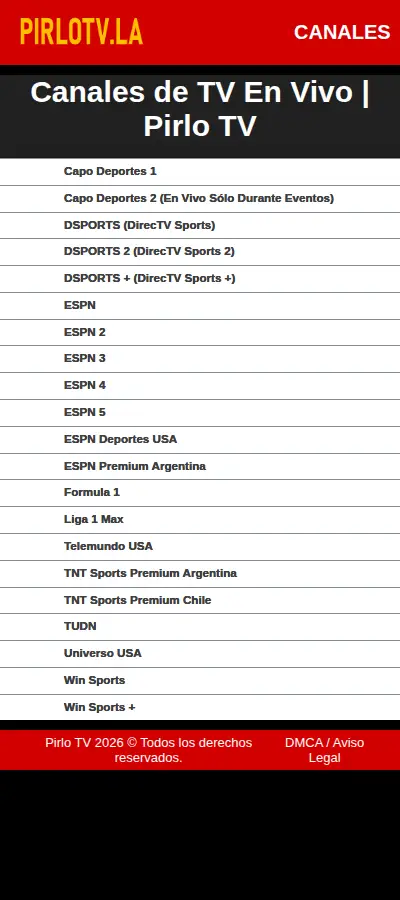
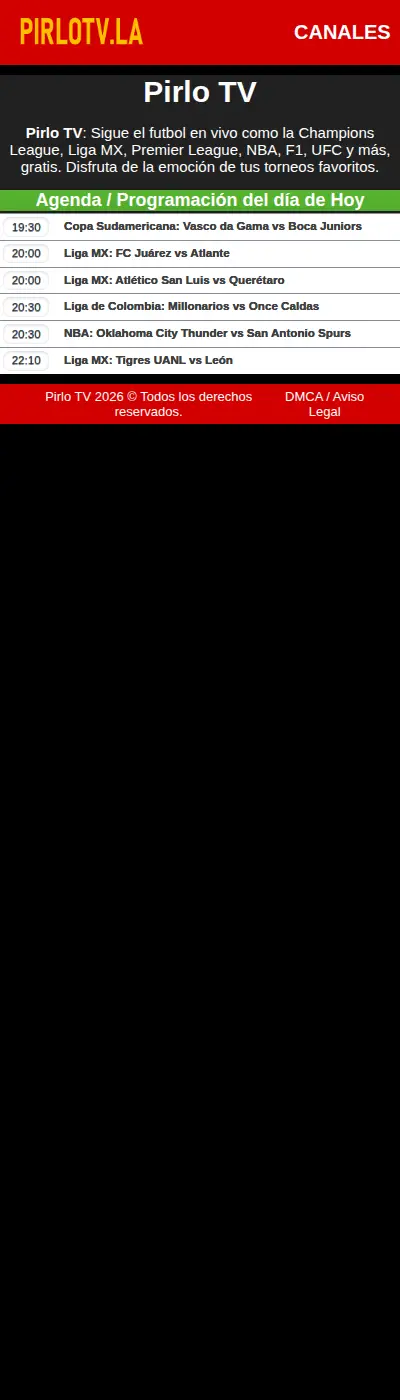
Every frame below is a real capture of the service itself at phone width: the daily agenda with its timed matches, one match opened into its channel links, the channels page roster, and the full day in one tall scroll. No mockups, no artwork, just the pages the app opens.
The front page, decoded
The Daily Agenda, Explained
The agenda is the front page and the whole idea. Under a green bar reading Agenda / Programación del día de Hoy, the day's events run in time order: a start time, the competition, and the match. On the evening captured for this review that meant a 19:30 Copa Sudamericana start, Vasco da Gama vs Boca Juniors, two Liga MX matches at 20:00, a Liga de Colombia match and an NBA game, Oklahoma City Thunder vs San Antonio Spurs, at 20:30, and a 22:10 Liga MX match, Tigres UANL vs León, to close the night.
Tap any match and it unfolds into its channel links. The Sudamericana game in our capture opened into Canal 1, Canal 19, Canal 20 (HD), Canal 21 (HD), Canal 22 (HD) and Canal 23 (HD). That depth is Pirlo TV's quiet strength: big matches carry several routes in, including HD variants, so viewers can move to another link rather than give up. Our agenda guide in the blog walks the page top to bottom.
Canales de TV En Vivo
The Live Channels Roster
The channels page, titled Canales de TV En Vivo, keeps a standing roster of live channels for viewers who know exactly what they want to watch. Listed today: Capo Deportes 1, Capo Deportes 2, DSPORTS, DSPORTS 2, DSPORTS +, ESPN, ESPN 2, ESPN 3, ESPN 4, ESPN 5, ESPN Deportes USA, ESPN Premium Argentina, Formula 1, Liga 1 Max, Telemundo USA, TNT Sports Premium Argentina, TNT Sports Premium Chile, TUDN, Universo USA, Win Sports and Win Sports +.
Read the roster as a map of the audience: South American football channels sit beside US Spanish-language staples and a dedicated Formula 1 channel, which matches the agenda's mix exactly. Channels and agenda back each other up. If a match matters to you, the agenda finds its links; if a channel matters to you, the channels page takes you straight there.
Football, plus four more sports
Leagues and Sports Covered
Football coverage runs deep in two directions. From Europe: the Champions League, the Europa League, LaLiga, the Premier League and Serie A. From the Americas: Liga MX, the Copa Libertadores, the Copa Sudamericana, the Concachampions Cup and the Liga de Colombia. For a Spanish-speaking football audience, that is close to the whole map: European nights, Mexican league weekends and South American cups in the same agenda.
Beyond football, Pirlo TV follows the NBA through its season, Formula 1 across its calendar, and UFC and boxing cards as they land. Fans who search Pirlo TV futbol en vivo usually arrive for the football and stay because the rest of their sporting week is on the same page.
On your phone in a minute
How to Install the App on Android
Installing the app takes less than a minute, because the file is tiny. The honest framing first: this is a streaming front end, so it needs the internet every time it opens, and it needs a phone running Android 7.0 or newer.
- Download the file: tap the download button on this page, go through the short countdown on the download page, and save the 25 KB file. It lands almost instantly, even on a slow connection.
- Allow the install: open the file and allow installs from your browser when Android asks. That prompt is standard for any APK installed outside an app store.
- Open the app: the Pirlo TV icon, the gold wordmark on red, appears in your app list. Open it and the service loads inside the app, agenda first.
- Pick your match: scroll the day's agenda, tap the match, and choose a channel link. If one link misbehaves, go back and take the next one; popular matches carry several.
Because the Pirlo TV app itself is 25 KB, storage is a non-issue: this install fits on phones where a single photo album would not. The blog's install guide covers the same steps with the common snags answered.
Habits of smooth evenings
Watching Live, Done Well
Watching well on Pirlo TV is mostly about two habits. First, arrive through the agenda rather than hunting the web at the start of a match: the agenda's links are gathered for that event, including HD options, and they are ordered for the day. Second, treat the link list as depth, not decoration. Live links vary in load through an evening, and Pirlo TV's design assumes you will switch when one fades.
A steady connection matters more than a fancy phone. Live video of any kind punishes a dropping signal, and our buffering guide explains the fixes that actually help: a stronger Wi-Fi position, fewer background downloads, and the right link choice. Viewers who prefer a bigger screen can mirror the phone to a TV; the service itself asks for nothing special.
Checked before listing
Safety and Verification
We treat this download the way we treat every file on this site. The app package (com.pirlotv.app) and its 25 KB size are checked against the build we describe, the file is installed and opened on our test phones, and the service it loads is the genuine pirlotv.la agenda and channels pages, verified capture by capture for the screenshots above.
Two honest notes belong here. Pirlo TV carries advertising of its own and a DMCA / Aviso Legal page in its footer, and its streams are Pirlo TV's responsibility, not this site's: we publish the Pirlo TV app and the guides, and we do not broadcast anything. And because the app is a front end, it can only ever be as good as your connection and the service's links on the night, which is precisely what our guides help you manage.
File, phone and data
Technical Details
The numbers explain the design. The APK is 25 KB because the Pirlo TV app holds no video and no channel data of its own: it opens the live service, so the agenda on your phone tonight is the agenda the service is publishing tonight. It runs on Android 7.0 and up, which covers the great majority of phones still in daily use.
Data use is the one running cost to plan for, and it belongs to the watching, not the app: live video commonly uses hundreds of megabytes an hour depending on quality, so long evenings of Pirlo TV En Vivo are a Wi-Fi pleasure and a mobile-data decision. Our data usage guide breaks the maths down by match length.
Earlier builds
Old Versions
With a front-end app, old versions are mostly a curiosity. The service does the changing, so an older copy of the app generally shows the same agenda as a new one, and there is rarely a feature locked inside a newer file to chase.
We still keep the current build here and re-check it as Pirlo TV evolves, because wrappers occasionally need a refresh when a site changes its habits. If your copy ever loads oddly, fetching the fresh file from this page and installing it over the old one is the whole repair, and it takes seconds at this size.
Other ways to watch
Other Ways to Watch
The alternatives divide by habit. Viewers who want a broadcaster's own app get polish and accounts and paywalls in exchange. Viewers who want a general video app get everything except the sport they opened it for. The agenda-first services are the real neighbours here, and among them this one earns its place with the depth of links per match and a channels roster that matches its football heartland.
If your evenings are football above all, with NBA and grand prix weekends around it, the honest comparison is simple: open the agenda on a match night and see whether your game is listed with working routes in. Most nights, it is.
When something fades
Troubleshooting
A channel link will not play. Return to the match and choose the next link. Popular matches carry several, including HD variants, and links vary through an evening.
The picture keeps pausing. That is connection, not the app. Move closer to the router, pause other downloads on the network, and try a different link for the same match.
The Pirlo TV app opens to a blank page. Check the connection first; a front-end app has nothing to show offline. Then close and reopen it so the service reloads clean.
The agenda looks like yesterday's. Pull the page down to refresh. The agenda is published daily by Pirlo TV, and a cached copy is the usual culprit.
Our buffering and common questions guides in the blog keep the longer answers, in the order to try them.
Staying current
How to Update Pirlo TV
Updating is the smallest job on this page. Because the agenda and channels live on the service, most days there is nothing to update at all: your app already shows today's page. When we publish a refreshed build, download the file from this page and install it over your existing copy. Your icon, your place and your habits all stay where they were.
After any update, open the Pirlo TV app once on Wi-Fi and let Pirlo TV load fully before a match depends on it. First loads settle the connection, and a match night deserves a settled app.